Yes, this is set up
Robyn
. Not sure how to get form submissions to go into contacts, though.
Notified 2 people
Robyn,Project Manager
Thanks
Ian
I asked the hubspot chat bot and this is what was said:
"HubBot To get submissions from an Elementor form into HubSpot contacts, you can use the HubSpot integration available within Elementor. Here’s a step-by-step guide:
Enable HubSpot Integration in Elementor:
In your WordPress dashboard, navigate to Elementor > Settings. Click on the Integrations tab. Find HubSpot and click the "Connect" button. Follow the prompts to authorize the connection between Elementor and HubSpot. Create a Form in Elementor:
Open the page where you want to add the form in Elementor. Drag and drop the Form widget onto your page. Customize the form fields as needed. Set Up the Form Actions:
After customizing the form, go to the Actions After Submit section in the Form widget settings. Add the "HubSpot" action. Configure the HubSpot action by mapping the form fields to the corresponding HubSpot contact properties. Publish Your Page:
Once your form is set up and the fields are mapped correctly, publish your page. Now, every time a visitor submits the form, their information will be sent to HubSpot and added as a contact.
If the form submissions aren’t appearing in HubSpot, ensure that the integration is connected correctly and that the form fields are mapped properly.
For more details on creating forms in HubSpot, you can refer to this guide .
If you encounter any issues, let me know, and I can assist further!
Notified 2 people
Ian Parsons,Head Chef
Robyn
that's what we've done so far, but we need to get the form submissions from Marketing > Forms in HubSpot to Contacts. Happy to chat about this quickly if that would help?
Notified 2 people
Robyn rescheduled this to-do
Was
Now
Notified 1 person
Xoliswa Shandu
Progress Update: HubSpot Customer Contact Form created on Gravity form. Created email, name and last name field connections for Hubspot. Confirmation on requirement for the Message data on Hubspot.
Robyn
I'd like to confirm if we are also connecting all the fields to Hubspot?
Notified 3 people
Robyn,Project Manager
Xoliswa
thanks so much - yes we are connecting all the fields - thank you!
Notified 3 people
Xoliswa Shandu
Hello
Robyn
,
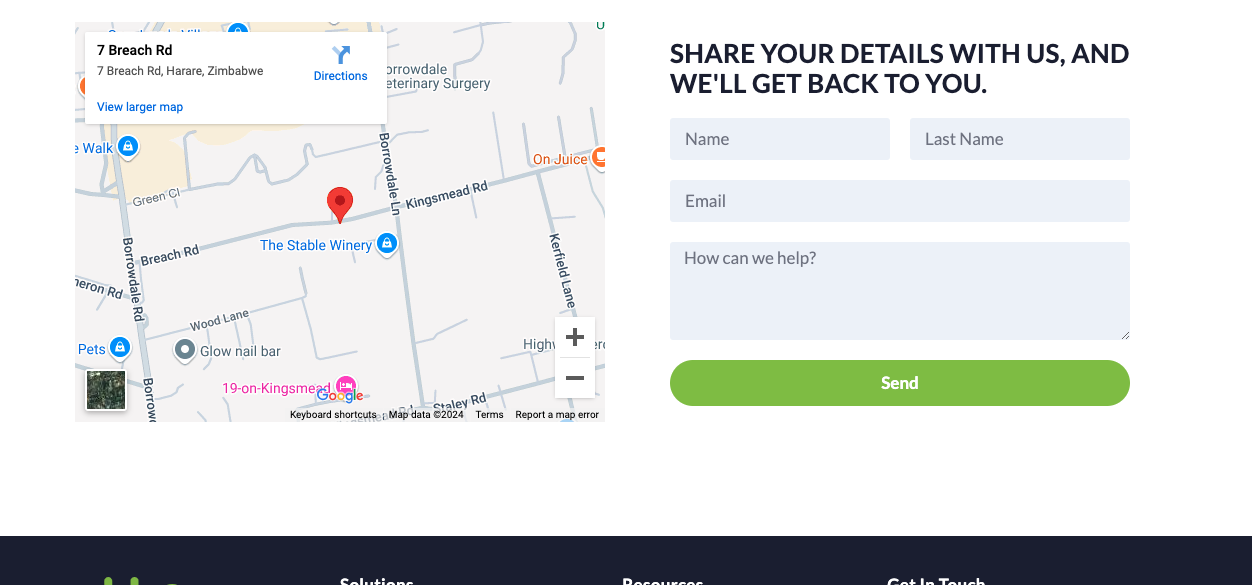
I have created the contact us form as a Gravity form, connected it to submit to hubspot and ensured the styling of the form is copied over.
I did have challenges with the styling placement but David was a champ and assisted me with that.
 Xoliswa S.





https://knowledge.hubspot.com/integrations/install-the-hubspot-wordpress-plugin?zorseWidget=true&hubs_content=knowledge.hubspot.com/forms/use-non-hubspot-forms&hubs_content-cta=HubSpot%20WordPress%20plugin.
"HubBot
To get submissions from an Elementor form into HubSpot contacts, you can use the HubSpot integration available within Elementor. Here’s a step-by-step guide:
Enable HubSpot Integration in Elementor:
In your WordPress dashboard, navigate to Elementor > Settings.
Click on the Integrations tab.
Find HubSpot and click the "Connect" button.
Follow the prompts to authorize the connection between Elementor and HubSpot.
Create a Form in Elementor:
Open the page where you want to add the form in Elementor.
Drag and drop the Form widget onto your page.
Customize the form fields as needed.
Set Up the Form Actions:
After customizing the form, go to the Actions After Submit section in the Form widget settings.
Add the "HubSpot" action.
Configure the HubSpot action by mapping the form fields to the corresponding HubSpot contact properties.
Publish Your Page:
Once your form is set up and the fields are mapped correctly, publish your page.
Now, every time a visitor submits the form, their information will be sent to HubSpot and added as a contact.
If the form submissions aren’t appearing in HubSpot, ensure that the integration is connected correctly and that the form fields are mapped properly.
For more details on creating forms in HubSpot, you can refer to this guide .
If you encounter any issues, let me know, and I can assist further!
HubSpot Customer Contact Form created on Gravity form. Created email, name and last name field connections for Hubspot. Confirmation on requirement for the Message data on Hubspot.
I have created the contact us form as a Gravity form, connected it to submit to hubspot and ensured the styling of the form is copied over.
I did have challenges with the styling placement but David was a champ and assisted me with that.
Form on the Frontend view:
https://www.gikko.net/contact-us?preview_id=21&preview_nonce=e8e75652c6&preview=true
Tested submission on Hubspot:
Test Submission under Sam Smith - All fields recorded on Hubspot.
I have published the form, all is looking good.
I tested again so there should be two Hubspot entries now.
https://www.gikko.net/contact-us
Please let me know if I may attach screenshots on tasks, I don't want to bombard basecamp with testing screenshots if it may cause an issue.