
DSI phase 3

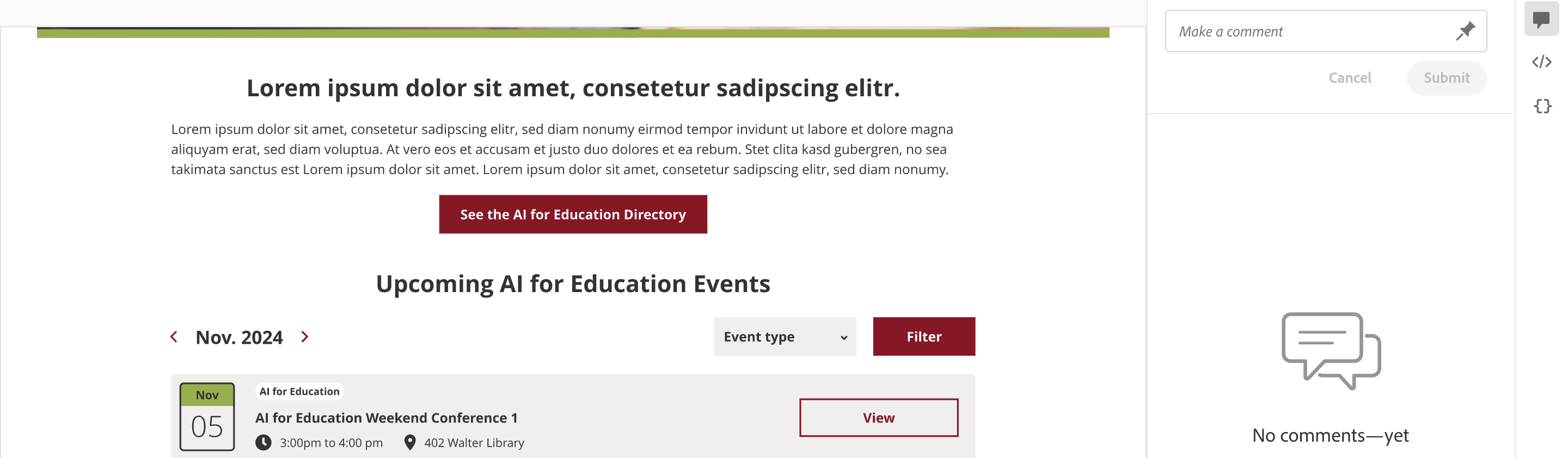
Missing year from date section

Assigned to
Xoliswa Shandu, Matogen Digital Xoliswa S.
Notes
Xoliswa Shandu, Matogen Digital Xoliswa I tested the items you mentioned and they worked well, I wasn't sure if these are still work in progress but see below 

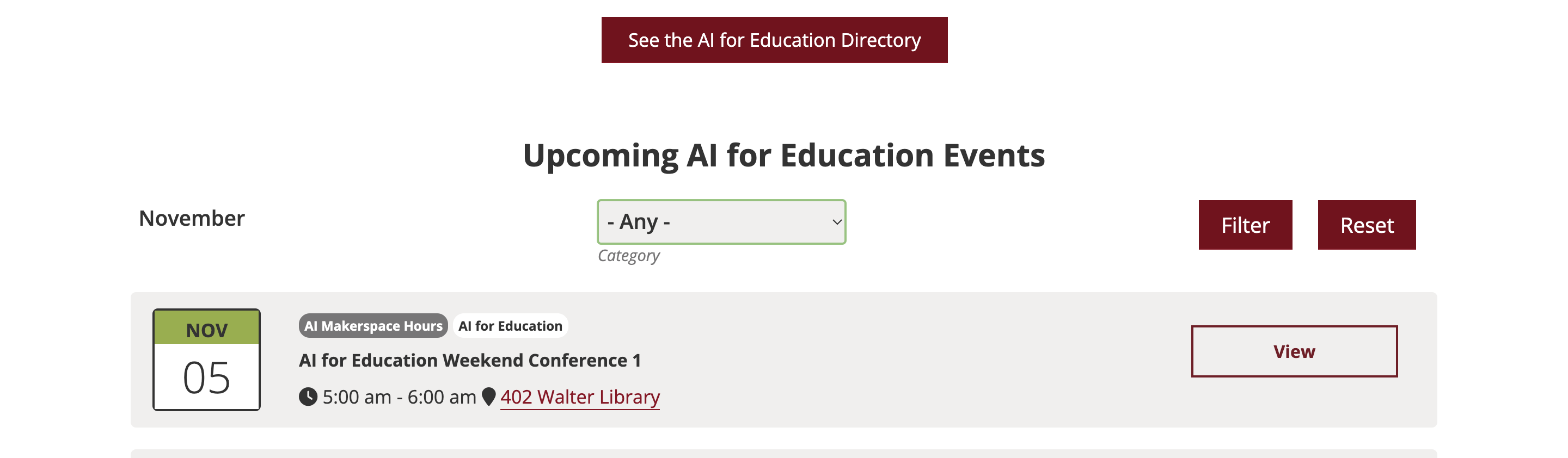
There's a year missing from the month - Lau's design has a year as well  - I know this came up the other day with MSI so not sure if we need to consider it here Laura Hurley, Designer, UX and Engagement Specialist at Matogen Digital Laura Also the little arrows that allow you to skip to the next month are missing which feels like a bit of functionality that might be missing - I am happy to create individual tasks for these but please let me know if you are perhaps sharing another round of testing for those parts?

Prototype

Dev


Comments & Events

Xoliswa Shandu, Matogen Digital
Hey Robyn, Project Manager at Matogen Digital Robyn , thank you,

I did bring back the styling for the arrows maybe its hidden behind cache, but that is weird because I did clear cache after deploying yesterday.

In terms of the year, we did not discuss adding the year for this one but I am happy to implement the year Laura Hurley, Designer, UX and Engagement Specialist at Matogen Digital Laura please confirm.
Robyn, Project Manager at Matogen Digital
thanks Xoliswa Shandu, Matogen Digital Xoliswa I am not spotting the change but the cache is a bastard, I did a cache buster and still not seeing it but happy to move on if you can see it

Re the year, no worries, Laura Hurley, Designer, UX and Engagement Specialist at Matogen Digital Laura  to confirm next steps when she's ready 
Xoliswa Shandu, Matogen Digital
Robyn, Project Manager at Matogen Digital Robyn   Let me try and replicate it, may I ask what your screen resolution is and which browser are you using mamasita?
Robyn, Project Manager at Matogen Digital
Hello me lovely Xoliswa Shandu, Matogen Digital Xoliswa   I was using google chrome and I am on a Macbook Pro  - my test was on the laptop because the power was out (electrician was here putting us onto full solar ) so I did all my tests on the laptop only today.

Screen - 13.3-inch (2560 × 1600)

Thanks darl! 
Xoliswa Shandu, Matogen Digital 👍
Robyn, Project Manager at Matogen Digital
For reference, its perfect on my big screen & I am seeing it correctly on the laptop screen now too! Xoliswa Shandu, Matogen Digital Xoliswa  yay!
Xoliswa Shandu, Matogen Digital
Robyn, Project Manager at Matogen Digital Robyn Yay, awesomeness! 
Robyn, Project Manager at Matogen Digital 🙌✨🎉
Laura Hurley, Designer, UX and Engagement Specialist at Matogen Digital
Hi Xoliswa Shandu, Matogen Digital Xoliswa Robyn, Project Manager at Matogen Digital Robyn – Sorry only joining in now. We will need to add the year in as per the prototype, especially because the school year runs from September to July in America (see issue no.3 below for reasoning). Sorry if that wasn't clear!🫣

I am having several different issues – weird stuff happening. 
  1. When I navigated to the page for the first time, the month scroller was set for January. But since then is now on November, just worried this might be an issue for new visitors...? Hopefully not, because I see November now. But going in Incognito I also get Jan..
  2. After refreshing, I see November, but no arrows to scroll between months. I've tried cache busters.. but still not seeing the arrows on my side. However, clicking on the month opens a dropdown of all the months in this year.
  3. When I scroll the months on Incognito I can't go before Jan or after Dec, this will be an issue given the way Americans run their school years.
  4. When I got to December it changed from the scroller to a dropdown (incognito).
Robyn, Project Manager at Matogen Digital
Xoliswa Shandu, Matogen Digital Xoliswa  - I know we parked this to see about cache, but just to let you know I am also having the scrolling issue that Lau had on the month - its not allowing me to go past December.  Please check this out next week, thanks! 
Xoliswa Shandu, Matogen Digital
Hello Laura Hurley, Designer, UX and Engagement Specialist at Matogen Digital Laura Robyn, Project Manager at Matogen Digital Robyn ,

So I took a look and resolved the following items and I just made on the things I'm struggling with:

Month selection functionality has been updated :
- Year has been included in filter
- Initial View we have the  latest posts and 'Select a Month' by default
- Filter events by month and year

Test Notes:
- Navigate to Events, CLA DSI or AI for Education page
- Latest months display of events if available
- Select a Month options to have Month. Year format
- When option selected the events display must update to display related month and year selected
- When clicking on arrows to the left and right the select should update to the relevant option
- When user selects month and year with no events , a no events message should show

Xoliswa Shandu, Matogen Digital
Xoliswa Shandu completed this to-do.